
iPhone Sizing Guide
Someone like a phone that's small, sleek, and stylish, while others prefer something with a bit of heft and a big enough screen to make watching movies with the girls a possibility. For Wildflower, every iPhone is a canvas for our limited edition cases, which is why we're going to dig super deep into the iPhone models we cover so you can pick the right size.
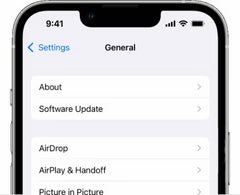

Step 1
Navigate to Settings
On your iPhone, go to Settings > General > About
Step 2
In About, to the right of the "Model Name" you'll see the iPhone size. Order the same size Wildflower Case!
